Viglet Shio CMS: Developer Guide
Introduction
This chapter provides concepts and other information required to perform Shio CMS development tasks.
About the Shio CMS
Viglet Shio CMS allows administrators and contributors to use a graphical interface to define how content is presented on web sites. The Themes area is where presentation objects are managed. View Page shows the page completely rendered.
There are 2 types of site views: Management and Published, where:
- Management: Contains all content on the site, both published and unpublished and drafts
- Published: Site that displays only published content. It is necessary to publish the contents for them to be displayed.
The Shio CMS has example Page Layouts and Regions, which can be viewed when the site is created, and can serve as a starting point for creating your site.
Page Layouts and Regions
A Page Layout is a basic building block for creating and managing pages using repeated patterns. Each page generated is associated with exactly one Page Layout, which controls the layout, theme and regions on the page.
The basic purpose of the presentation is to display folders and contents from the Shio CMS repository as web pages. At this point, you need to associate folders and content with Page Layouts.
A single template can be applied to various folders and content, which greatly facilitates the process of development and management of the website.
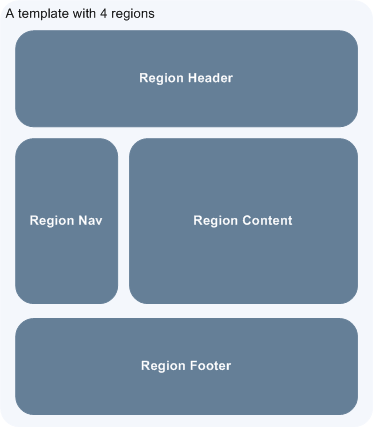
API for Components
In Page Layouts and Regions you can have API for Components, which are responsible for being able to render different types of content sources from the Shio CMS repository. For example, a Query Component can be used to filter a list of contents in a folder, while a Navigation Component can render folders as menus on your website.
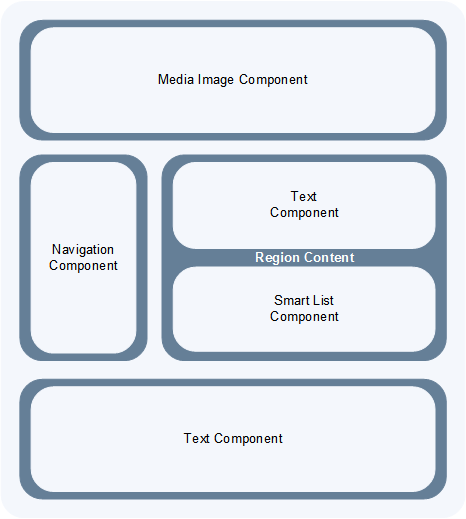
The hierarchical structure of this template and its regions with Component API:
- Header Region: Navigation Component
- Navigation Region: Navigation Component
- Content Region: Query Component
- Footer Region: Navigation Component
The header is optional.
Implementation Architecture
Overview
To customize Shio CMS, you must implement Java Archive (JAR) files.
Deploy Table
| Directory | Deployed File | Provided By |
|---|---|---|
<SHIO_DIR>/ | viglet-shio.jar | Shio |
<SHIO_DIR>/ | viglet-shio.conf | You |
viglet-shio.jar
This JAR file is deployed when you install and configure Shio CMS.
viglet-shio.conf
The viglet-shio.conf file specifies Shio CMS configurations. Shio CMS is based on Spring Boot 2, therefore all configurations present in this solution are valid. More information at: Customizing a Script When It Runs
Features
General
Search Ready
Contents are indexed automatically. This way, you can use embedded search engine in your site. Simple and powerful.
Native Cache
Your site will be optimized with native cache. Faster and hassle free.
Pure Javascript
Entire development use directly themes using Javascript language. No deploy, just create and ready.
Microservices
Run Multi-container Docker applications using Docker Compose, integrating with Nginx, MariaDB and MongoDB.
Databases
Supports all databases supported by Spring Framework:
- H2
- MySQL
- Oracle
On Install
- Import the Sample Site using sample-site repository
- Create a Stock Site using stock-site-import repository
- Import the Post Types
- Create admin user using the password: admin
Version Control
Use Github to create a version of objects.
Publishing
- When a post is created, its status will be Draft.
- If the post was saved and published, it will appear on Site and its status will be Published.
- If the post is published but was changed, its status will be Stale.
- If the post is unpublished, it will disappear from Site and its status will be Unpublished.
GraphQL
Allows access to Content using GraphQL.
Modeling
Create new Post Types with different attributes, that fit your business.
Post Type
- Define the Name, Description and Identifier for Post Type
- Define who will be responsible for publishing
Fields
- Order the Fields of Post Type
- Create a Text, Description and Identifier for each Field
- Define if the Field is Title and/or Description of Post Type
Search Navigation
Define how the content will be indexed into Viglet Turing:
- Search Field Association: Use default fields of Viglet Turing Semantic Navigation
- Create Additional Search Field: Use a custom field of Viglet Turing Semantic Navigation
Configuration Console
Auth Providers
- Shio Native
- OpenText Directory Service
Exchange Providers
Supports the following providers:
- OTCS - OpenText Content Services: Import Documents from OTCS
- OTMM - OpenText Media Management: Import Files from OTMM
Search Providers
Define how the Search of Site will work.
Email
Configure the Email Service for Notifications.
Users
Create, modify or delete users that can access the console or protect pages. Associate users to Groups.
Groups
Create, modify or delete groups and add users into groups.
Administration
- Reorder posts into folder with instant results on site pages
- Generate spreadsheet of folder (each sheet is a Post Type)
- Download the site
- Import Site
- Create Site with pre-defined theme
- Create workflows
- Create folders, post types, posts
- Upload multiple files into folder
- Change Folder View: List or Thumbnail
- Navigate between folders through breadcrumb
- Preview Site using "View Site" button
- See all commit changes of site
Permissions
Console: Define Permission of Console, adding Groups and Users
Page: Define Permission of Pages of Site, adding Groups and Users
Protected Page
Through Page Permission the Site allows Protected Pages, with Users defined on Administration Page.
Properties of Site
- Name, Description, URL
- Association between Post Type and Page Layout
- Define searchable content
- Define which Folder will save Form posts
Post Types
System Post Types: Text, Photo, Video, Quote, Link, File, Region, Theme, Page Layout, Alias, Folder Index
Field Types
Create complex custom Post Types using many Field Types:
Hidden, Text, Text Area, Ace Editor (HTML), Ace Editor (Javascript), HTML Editor, Content Select, Relator, Combo Box, Recaptcha, Form Configuration, Date, Multi Select, Tab, Check Box
Creating Page Layouts
Javascript
Javascript can be used in Page Layouts and Regions with the following features:
- Javascript Libraries - Include custom Javascript files
- Javascript Code - Server-side processing that returns a rendered view
- HTML Code - Separate rendering template used by Javascript Code
Javascript views use the shObject API. More information at the Javascript API documentation.
Developing Regions
Shio CMS provides pre-configured components (Navigation Component, Query Component) that simplify web page construction.
Each region can call one or more components. The final result is cached unless TTL is set to zero.
Using Image and Content URLs
When writing a region, use the following shObject methods:
generateFolderLink(id)- Generates link for a FoldergeneratePostLink(id)- Generates link for a Post or FilegenerateObjectLink(id)- Generates link for any object (Folder, Post, or File)