Generative AI & LLM Configuration
Turing ES integrates Generative AI throughout the platform via Spring AI, providing a unified abstraction layer over multiple LLM providers and embedding backends. The GenAI capabilities are organized around four connected concepts: LLM Instances, Tool Calling, MCP Servers, and AI Agents — which together define how the system reasons, retrieves, and responds.
RAG (Retrieval-Augmented Generation) is the primary pattern used to ground LLM responses in real content: both the Knowledge Base (files stored in MinIO) and Semantic Navigation Sites can serve as RAG sources.
Global Settings
Before configuring individual LLM Instances, AI Agents, or RAG sources, establish platform-wide defaults in Administration → Settings. These defaults apply wherever no specific override is configured.
| Setting | Description |
|---|---|
| Default LLM Instance | The LLM provider used when no specific instance is selected in an AI Agent or SN Site |
| Default Embedding Store | Which vector database backend to use (ChromaDB, PgVector, or Milvus) |
| Default Embedding Model | The embedding model used to generate vector representations during indexing and at query time |
| RAG Enabled by Default | Whether RAG is pre-enabled for new Semantic Navigation Sites |
| Python Path | Absolute path to the Python executable used by the Code Interpreter tool |
| Email Settings | SMTP configuration for system notifications |
The embedding store and embedding model must be consistent across indexing and query time. Changing the default embedding model after documents have been indexed will cause embedding dimension mismatches and incorrect similarity results. A full re-indexing of all content is required.
LLM Instances
An LLM Instance is a named, configured connection to an LLM provider. Multiple instances can coexist — different AI Agents, SN Sites, and the Chat interface can each use a different instance independently.
Turing ES supports six vendor types: OLLAMA, OPENAI, ANTHROPIC, GEMINI, GEMINI_OPENAI, and AZURE_OPENAI.
| Vendor | Default Model | Embedding | Tool Calling |
|---|---|---|---|
| OLLAMA | mistral | ✅ | ✅ |
| OPENAI | gpt-4o-mini | ✅ | ✅ |
| ANTHROPIC | claude-sonnet-4-20250514 | ❌ | ✅ |
| GEMINI | gemini-2.0-flash | ❌ | ✅ |
| GEMINI_OPENAI | gemini-2.0-flash | ❌ | ✅ |
| AZURE_OPENAI | gpt-4o | ✅ | ✅ |
For the full UI reference — form sections, provider-specific options, generation parameters, capability matrix, and API key security — see LLM Instances.
Embedding Stores & Models
Turing ES delegates vector storage to one of three backends (ChromaDB, PgVector, Milvus) and uses an embedding model to generate and query vectors. The choice of backend and model affects both storage cost and similarity quality.
See Embedding Stores for backend comparison and Embedding Models for provider support, model selection guidance, and configuration details.
RAG Architecture
Retrieval-Augmented Generation (RAG) grounds LLM responses in indexed content. Rather than relying on training data alone, Turing ES retrieves the most semantically relevant documents and injects them into the prompt before generation.
Turing ES supports two RAG sources:
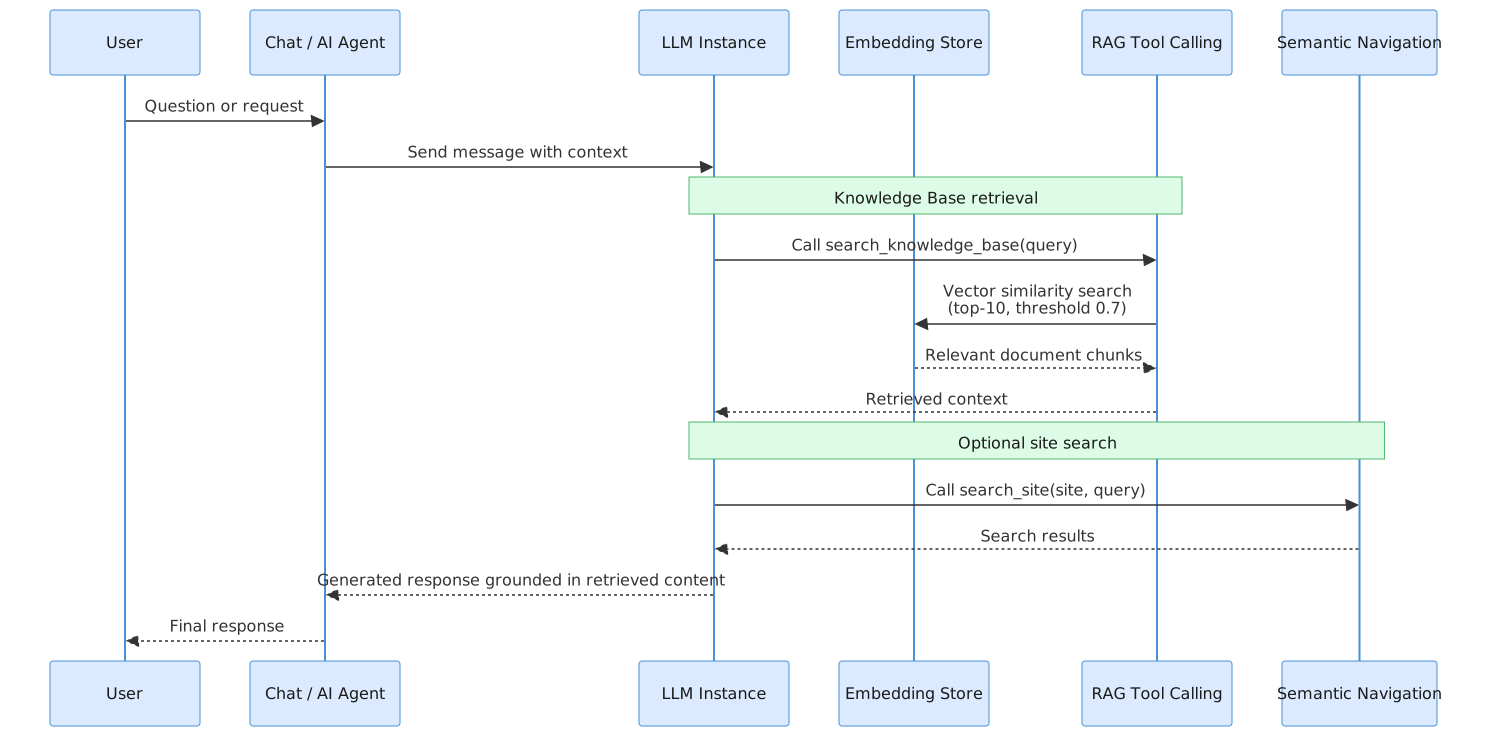
By default, Turing ES retrieves the top 10 most similar chunks with a similarity threshold of 0.7. Documents below the threshold are excluded from the context.
Knowledge Base (Assets)
The Knowledge Base is built from files managed in the Assets section — a file manager backed by MinIO. Files are extracted with Apache Tika, truncated to 100,000 characters, split into 1,024-character chunks, embedded, and stored in the active embedding store.
Full documentation is available on the Assets page.
RAG for Semantic Navigation Sites
When GenAI is enabled for an SN Site, indexed documents are also embedded and stored in the vector store alongside their Solr representation. This allows AI Agents and the SN Site chat to retrieve relevant content via semantic similarity. Configure this in the site's Generative AI section — see Semantic Navigation → Generative AI.
Documents indexed before GenAI was enabled do not have embeddings. A full re-indexing of the site is required to make existing content available for RAG queries.
Tool Calling
Turing ES includes 27 native tools across 7 categories that AI Agents can invoke autonomously: Semantic Navigation (15), RAG / Knowledge Base (4), Web Crawler (2), Finance (2), Weather (1), Image Search (1), DateTime (1), and Code Interpreter (1).
See Tool Calling for the full tool reference.
MCP Servers
AI Agents can connect to any external server implementing the Model Context Protocol (MCP) to access tools beyond the 27 native ones — company-internal systems, proprietary APIs, or public MCP services. Configured in Administration → MCP Servers.
See MCP Servers for transport types, configuration form, and examples.
AI Agents
An AI Agent combines a specific LLM Instance, a set of tools, and MCP Servers into a single deployable assistant. Each agent appears as a separate tab in the Chat interface and can be purpose-built for specific roles — enterprise search, data research, IT operations, and more.
See AI Agents for configuration, composition examples, and the agent execution flow.